Are you ready to transform your kitchen into the heart of your home? Whether you’re planning a complete renovation or a simple update, knowing how to draw a kitchen plan to scale is your first step to success.
Imagine having a clear, precise blueprint that helps you visualize your dream kitchen, making decisions easier and more confident. You might think it sounds complicated, but it’s simpler than you imagine. This guide is designed to help you create a detailed kitchen plan that fits your space perfectly, ensuring every appliance, cabinet, and countertop is exactly where it should be.
Stay with us, and discover how straightforward and rewarding it can be to map out your ideal cooking space.
Gather Essential Tools
Drawing a kitchen plan to scale needs specific tools. These tools help you measure and create a clear layout.
Gather the right items before you start. This makes the process easier and more accurate.
Measuring Tape And Scale Ruler
Measuring tape is key for getting real dimensions of your kitchen space. A scale ruler helps you draw those measurements smaller but correct on paper.
- Use the measuring tape to get wall lengths and appliance sizes.
- Choose a scale ruler that matches your drawing scale, such as 1:50 or 1:100.
- Mark the measurements lightly with a pencil on your plan.
Graph Paper And Pencils
Graph paper makes it easy to draw to scale. Each square can represent a set length, like 1 foot or 1 meter. Use pencils so you can erase mistakes.
| Tool | Purpose | Tips |
| Graph Paper | Helps keep lines straight and scale correct | Choose paper with a grid size that fits your scale |
| Pencils | Used for drawing and marking | Use a sharp pencil for clear lines |
| Eraser | Fixes mistakes | Keep it clean to avoid smudges |
Digital Drawing Tools
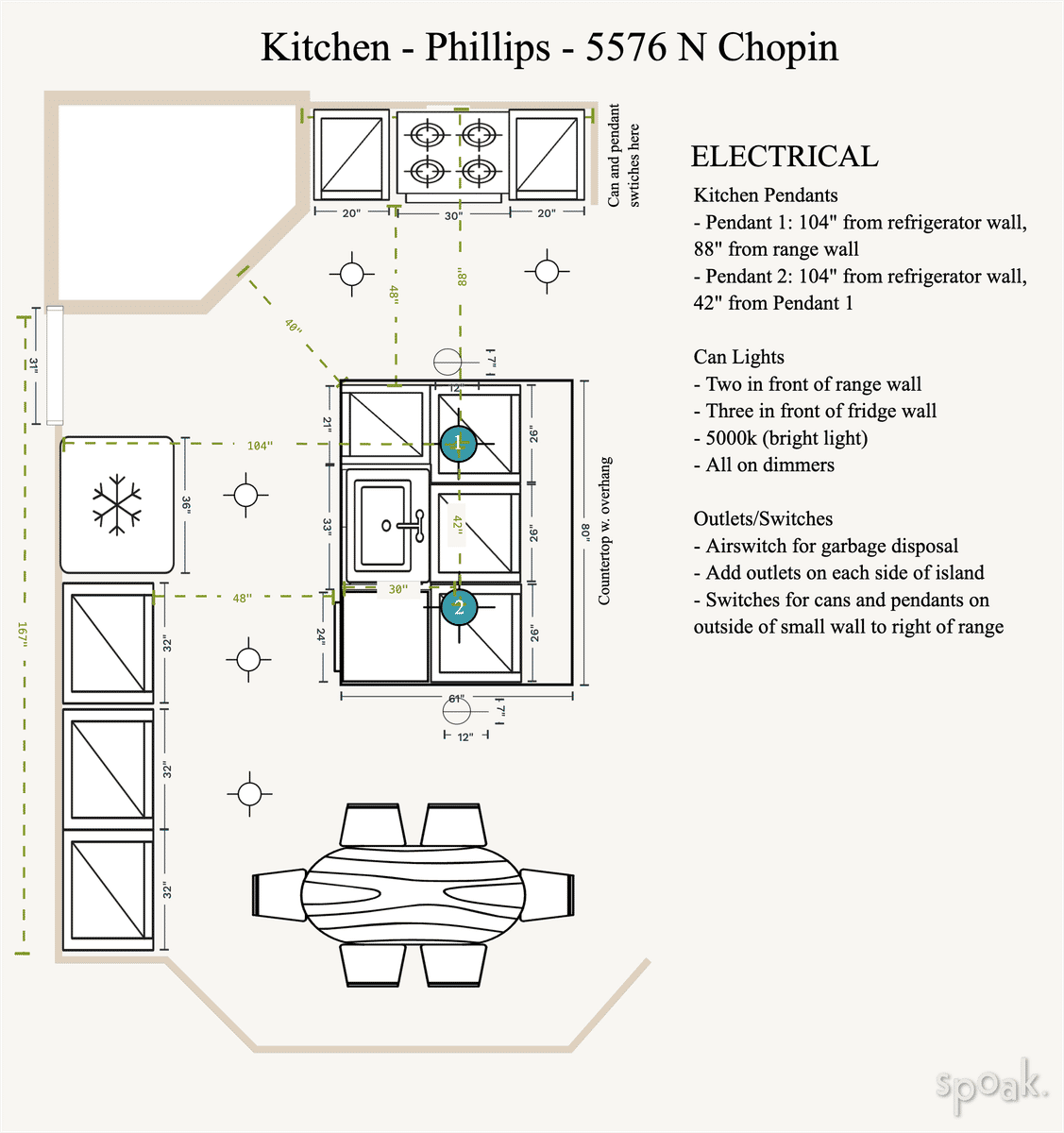
Digital tools can make drawing faster and allow easy changes. Many apps let you draw plans to scale on your computer or tablet.
- Use software like SketchUp, AutoCAD, or free online tools.
- Digital tools let you zoom in for details and correct errors easily.
- Save your work often and back up files to avoid data loss.
Credit: www.spoak.com
Measure Your Kitchen Space
Drawing a kitchen plan to scale starts with measuring your kitchen space. Accurate measurements help create a clear and usable layout.
Take your time to measure every part of your kitchen before you begin the design. This makes sure your plan fits perfectly.
Record Wall Lengths And Heights
Measure the length of each wall in your kitchen. Use a tape measure and write down each number carefully.
Also, measure the height from floor to ceiling. This helps you plan for tall cabinets and other features.
- Measure each wall from corner to corner
- Write down measurements in feet or meters
- Check heights at several points to find differences
Note Door And Window Positions
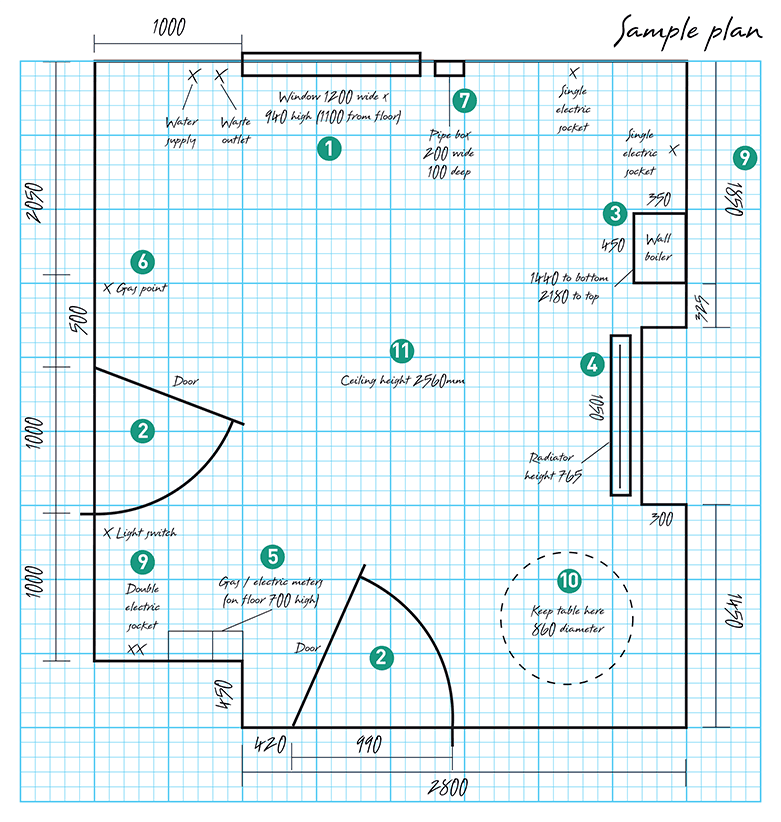
Mark the locations of all doors and windows on your plan. Measure their width and the distance from nearby walls.
This helps you avoid placing cabinets or appliances where they block openings or natural light.
- Measure door and window widths
- Measure distance from corners or walls
- Note the height from floor to bottom and top of windows
Account For Fixtures And Appliances
Measure all fixed items like sinks, stoves, and refrigerators. Include their size and location in your plan.
Knowing these sizes helps you plan spaces for new or existing appliances without errors.
- Measure width, depth, and height of appliances
- Record exact placement against walls or cabinets
- Include plumbing or electrical points if needed
Choose The Right Scale
Drawing a kitchen plan to scale means making a smaller version of your kitchen on paper. This helps you see how everything fits.
Choosing the right scale makes your drawing clear and useful. It shows the exact size of cabinets, appliances, and counters.
Common Scale Ratios For Kitchen Plans
Scale ratios tell you how much smaller your drawing is than the real kitchen. Pick one that fits your paper size.
- 1:50 means 1 unit on paper equals 50 units in real life
- 1:25 is bigger, showing more detail on the paper
- 1:100 is smaller, good for showing the whole room quickly
How To Convert Measurements
To draw to scale, convert real sizes into smaller ones using your scale ratio. This keeps your plan accurate.
Measure your kitchen in feet or meters. Then divide by the scale number to get the drawing size.
- If your kitchen is 500 cm long and scale is 1:50, draw 10 cm on paper
- For a 4 m wide kitchen at 1:25 scale, draw 16 cm wide
- Write down conversions to avoid mistakes
Benefits Of Using A Consistent Scale
Using the same scale throughout your kitchen plan helps keep all parts in correct size relation. This prevents errors.
A consistent scale helps you compare spaces and decide if appliances fit well. It makes your plan easy to understand.
- Helps builders and designers read your plan correctly
- Keeps measurements uniform across all drawings
- Makes changes and updates easier
Sketch The Floor Plan Outline
Drawing a kitchen plan to scale helps you see the space clearly. It shows where walls, doors, and fixtures will go.
Start by sketching the main shape of the floor plan. This outline forms the base for all details.
Drawing Walls To Scale
Use a ruler and scale to draw each wall accurately. Measure the length and mark it on your paper or software.
- Choose a scale, such as 1 inch equals 1 foot.
- Measure the real wall length in feet or meters.
- Convert the measurement to your chosen scale.
- Draw the walls with straight lines matching the scaled length.
- Check all corners and angles to keep the shape correct.
Marking Doors And Windows
Doors and windows affect the flow and light in the kitchen. Mark them clearly on the floor plan.
| Element | Symbol | Notes |
|---|---|---|
| Door | Arc showing swing direction | Draw the door width to scale |
| Window | Double lines on wall | Indicate window width and height |
Indicating Fixed Elements
Fixed elements include sinks, appliances, and cabinets. Show them in your plan for clear space use.
- Sink location and size
- Refrigerator position
- Oven and cooktop areas
- Cabinet outlines
Add Kitchen Fixtures
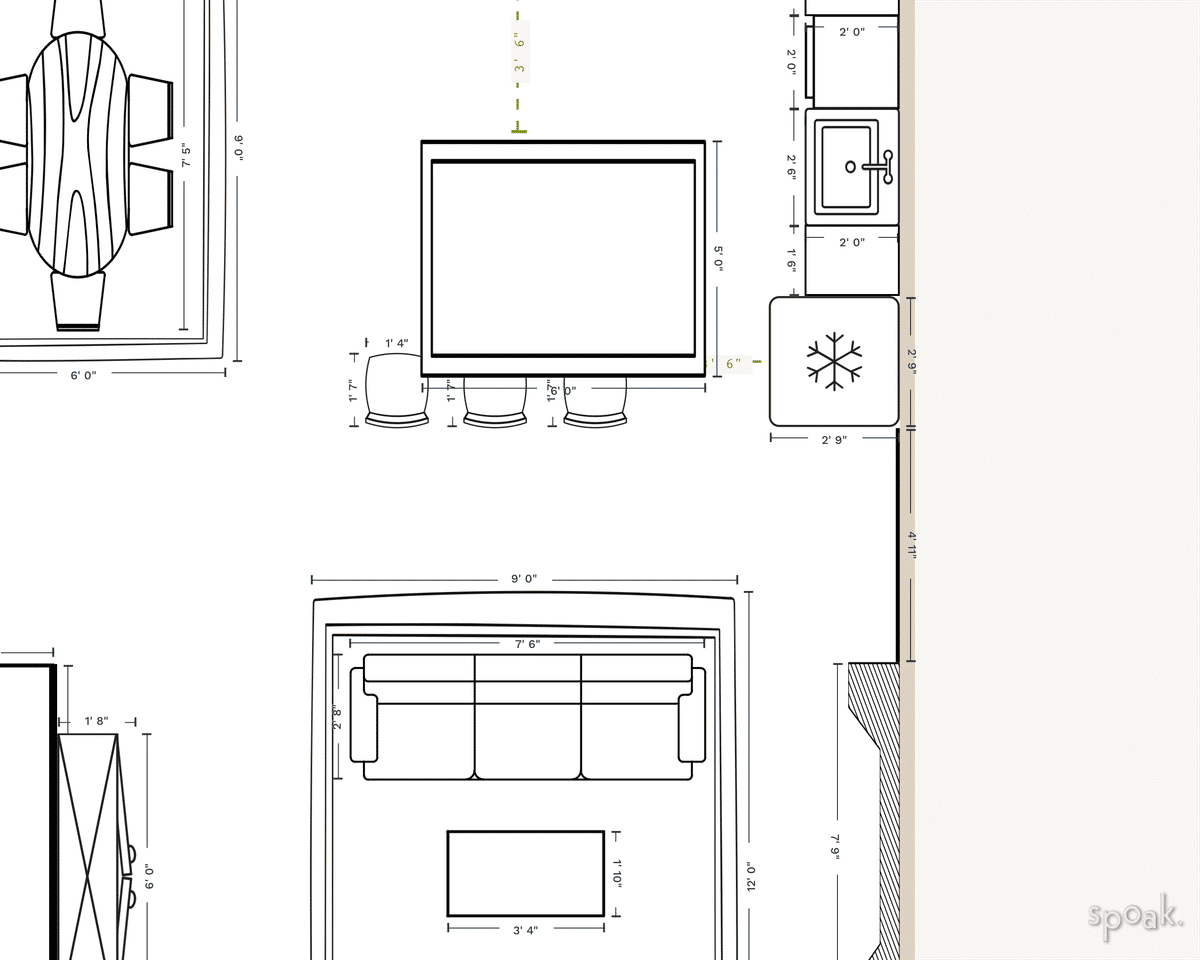
Adding kitchen fixtures is key when drawing a kitchen plan to scale. Fixtures include cabinets, counters, appliances, and necessary plumbing and electrical points.
Careful placement of these items helps make the kitchen functional and comfortable to use.
Placing Cabinets And Counters
Start by marking where cabinets and counters will go. Measure exact lengths to keep your drawing accurate. Include both upper and lower cabinets for a full view.
- Measure wall lengths carefully
- Decide cabinet sizes and styles
- Mark counter spaces between cabinets
- Leave enough room for walking and working
Positioning Appliances
Place appliances like the stove, fridge, and dishwasher in spots that allow easy access. Keep the work triangle in mind to improve kitchen flow.
| Appliance | Recommended Space (inches) |
| Refrigerator | 36-48 wide |
| Oven/Stove | 30-36 wide |
| Dishwasher | 24 wide |
| Microwave | Varies, usually above counter |
Including Plumbing And Electrical Points
Mark all plumbing for sinks and dishwashers clearly. Also add electrical points for appliances and lighting. This ensures your plan covers all utility needs.
- Sink water supply and drainage
- Dishwasher water and power
- Refrigerator water line (if needed)
- Electrical outlets near counters
- Lighting fixture locations
Credit: www.spoak.com
Refine And Label The Plan
After drawing the kitchen plan to scale, refining and labeling it is important. This makes the plan clear and easy to understand.
Labeling helps show where appliances, cabinets, and other features go. It also helps you check your plan for errors.
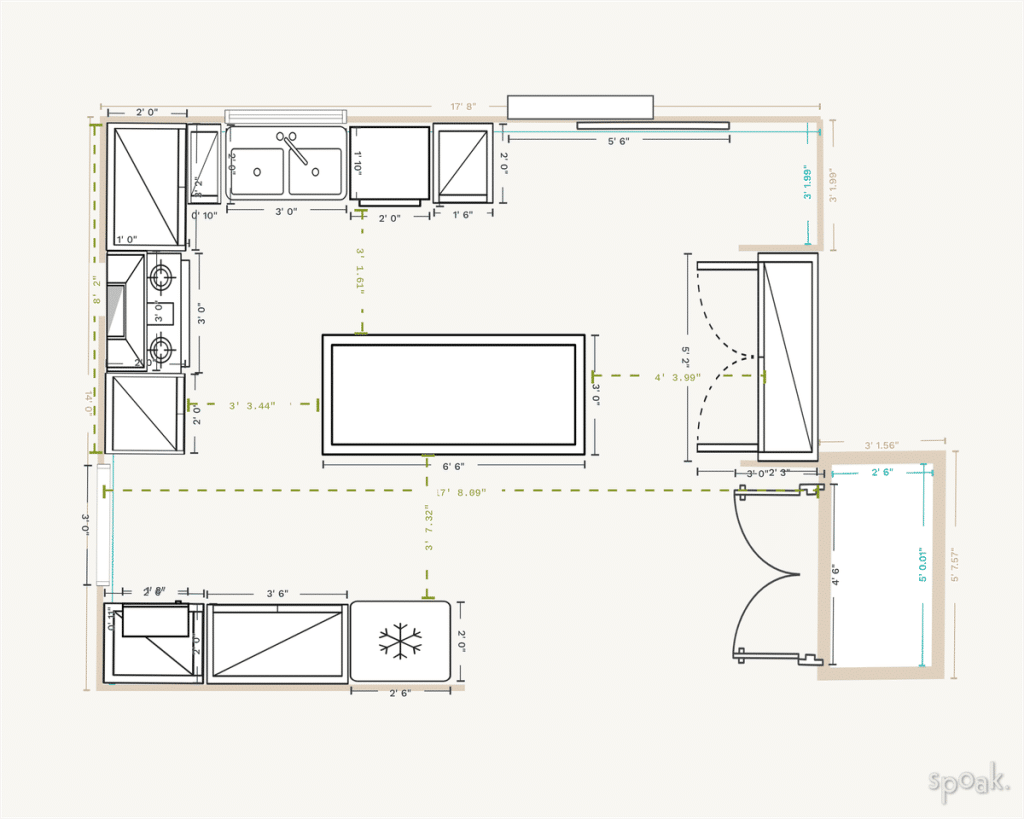
Adding Dimensions And Notes
Dimensions show the size of walls, counters, and spaces. Add them to help visualize the kitchen’s layout.
Notes explain special details like door swings or appliance types. Use short, clear phrases to avoid confusion.
- Mark the length and width of each wall
- Include space between appliances and cabinets
- Note the height of counters and shelves
- Write brief notes about materials or styles
Using Symbols And Legends
Symbols represent sinks, stoves, refrigerators, and more. Use common symbols to keep the plan simple.
A legend explains what each symbol means. Place it near the plan for easy reference.
| Symbol | Meaning |
|---|---|
| □ | Cabinet |
| ◯ | Sink |
| ▭ | Stove |
| ⬜ | Refrigerator |
Reviewing For Accuracy
Check all measurements to make sure they match the actual space. Accuracy avoids costly mistakes later.
Look over labels and symbols to confirm they are correct and clear. Ask someone else to review if possible.
- Verify wall lengths and counter sizes
- Ensure appliance placement fits the space
- Double-check notes for clarity and correctness
- Confirm symbols match the legend
Use Digital Tools For Precision
Drawing a kitchen plan to scale is easier with digital tools. These tools help you create accurate and clear designs.
Digital software allows precise measurements and quick changes. It saves time and reduces mistakes.
Popular Kitchen Design Software
Many software options help you design kitchens easily. They offer tools to draw walls, cabinets, and appliances to scale.
- SketchUp: User-friendly and good for 3D designs
- Home Designer Suite: Includes kitchen-specific features
- IKEA Kitchen Planner: Simple tool for IKEA products
- RoomSketcher: Easy to use with drag-and-drop features
- AutoCAD: Professional software for detailed plans
Advantages Of Digital Plans
Digital kitchen plans improve accuracy and save effort. You can adjust dimensions and see how changes look instantly.
They also help you avoid costly errors. Digital plans can show 3D views, making it easier to understand the layout.
- Easy to modify and update designs
- Accurate measurements reduce mistakes
- Visualize the kitchen in 3D
- Save multiple versions for comparison
- Share plans easily with others
Tips For Exporting And Sharing
Export your kitchen plan in common file formats like PDF or JPEG. This makes it easy to share with contractors or family.
Use cloud storage or email to send files. Check the plan on different devices to ensure it looks right everywhere.
- Save files in PDF for easy printing
- Use JPEG or PNG for quick image sharing
- Upload plans to cloud services like Google Drive
- Verify scale and details before sharing
- Include notes or labels to explain the design
Credit: www.staxtradecentres.co.uk
Common Mistakes To Avoid
Drawing a kitchen plan to scale helps you use space well. Avoiding mistakes saves time and money.
Some errors are easy to fix if you know what to look for. Here are common mistakes to watch out for.
Ignoring Scale Consistency
Using different scales on one plan causes confusion. Your kitchen layout will not match reality.
Always use the same scale for all parts. This keeps your drawing clear and accurate.
- Pick a scale like 1:50 or 1:100 and stick to it.
- Mark the scale clearly on your plan.
- Double-check measurements with a ruler or software tool.
Overlooking Appliance Clearance
Not leaving enough space around appliances makes the kitchen hard to use. Doors and drawers may not open.
Plan clearance for each appliance to allow easy access and movement.
- Leave at least 30 inches in front of ovens and refrigerators.
- Allow space for dishwasher doors to open fully.
- Check clearance for microwave and sink areas.
Skipping Detailed Measurements
Not measuring every wall, door, and window causes errors. Cabinets and counters may not fit well.
Include all dimensions in your plan for a precise layout.
- Measure wall lengths and heights carefully.
- Note window and door sizes and positions.
- Record distances between fixtures and corners.
Frequently Asked Questions
What Tools Do I Need To Draw A Kitchen Plan To Scale?
To draw a kitchen plan to scale, you need graph paper, a ruler or scale ruler, pencil, eraser, and measuring tape. Digital tools like CAD software can also help create precise, scalable kitchen plans easily and efficiently.
How Do I Measure My Kitchen Accurately For The Plan?
Measure your kitchen’s length, width, and height using a tape measure. Note window, door, and fixture locations. Record all dimensions carefully to ensure your scaled plan represents the actual kitchen accurately.
What Scale Is Best For Drawing A Kitchen Plan?
A common scale for kitchen plans is 1/4 inch equals 1 foot (1:48). This scale balances detail and space on paper, making it easy to visualize and modify your kitchen layout accurately.
How Can I Include Appliances In My Kitchen Plan?
Measure each appliance’s dimensions and draw them to scale within your plan. Position appliances logically for workflow and space efficiency, considering electrical and plumbing connections.
Conclusion
Drawing a kitchen plan to scale helps save time and money. It shows exact measurements for walls, cabinets, and appliances. This makes it easier to see how everything fits. Use graph paper or digital tools for accuracy. Check your plan twice before starting the project.
Clear and simple plans lead to better results. Take your time and enjoy the process. A good kitchen plan makes cooking and living more comfortable. Keep practicing to improve your drawing skills. Start your kitchen design with confidence today.