
Is your Kitchen Aid dishwasher acting up and leaving your dishes less than spotless? You’re not alone, and the good news is, you don’t have to call a repair person just yet.
Fixing your dishwasher yourself can save you time and money. You’ll discover simple, step-by-step tips to get your dishwasher running smoothly again. Imagine loading your dishes with confidence, knowing they’ll come out clean every time. Keep reading, and you’ll learn how to take control of your dishwasher troubles quickly and easily.
Common Kitchen Aid Dishwasher Issues
Kitchen Aid dishwashers are popular for their performance. Still, they may face some common problems. Knowing these issues can help you fix them quickly.
This guide covers common problems like starting issues, water draining, cleaning, leaks, and strange noises. Each section explains simple ways to identify and solve the problem.
Dishwasher Not Starting
If your dishwasher does not start, check the power supply first. Make sure the door is fully closed and latched. The dishwasher won't run if the door is open.
Look at the control panel for error lights. A faulty door latch or control board may cause this issue. Resetting the dishwasher can sometimes fix the problem.
- Check if the dishwasher is plugged in
- Ensure the circuit breaker is not tripped
- Close the door firmly
- Press the start button properly
- Reset the dishwasher by turning it off and on
Water Not Draining
Water left inside the dishwasher means poor drainage. This can be caused by a clogged drain hose or filter. Remove food debris from the filter regularly.
Check if the drain hose is kinked or blocked. The drain pump might be faulty and need replacement. Clean these parts to help water flow out smoothly.
- Clean the dishwasher filter
- Inspect and clear the drain hose
- Check the garbage disposal connection
- Test the drain pump for faults
Poor Cleaning Performance
Dishes not coming out clean can frustrate anyone. Make sure you load the dishwasher properly. Avoid blocking spray arms and use the right detergent amount.
Clogged spray arms and dirty filters reduce cleaning power. Hard water buildup inside the machine can also affect cleaning. Run a cleaning cycle with dishwasher cleaner monthly.
- Load dishes without blocking spray arms
- Use correct detergent and rinse aid
- Clean spray arms and filters
- Run a dishwasher cleaning cycle regularly
Leaking Dishwasher
Leaks often happen from door seals or hoses. Check the door gasket for cracks or dirt. Clean or replace it if needed to stop leaks.
Inspect water supply hoses and drain hoses for cracks or loose connections. Tighten or replace them to prevent water from leaking onto the floor.
- Examine door gasket for damage
- Clean the door seal area
- Check water supply hose connections
- Inspect drain hose for leaks
- Tighten or replace faulty parts
Unusual Noises
Strange sounds can mean something is wrong inside the dishwasher. Objects like utensils can block the spray arm. Remove any items that cause noise.
Worn motor bearings or a failing pump can also create noise. If the noise is loud or grinding, a professional check may be needed to avoid damage.
- Check for loose or stuck utensils
- Inspect spray arms for blockage
- Listen for motor or pump sounds
- Call a technician if noise persists
Basic Tools Needed For Repairs
Fixing your Kitchen Aid dishwasher can save money and time. You need some basic tools to do simple repairs safely.
This guide explains the main tools required to check and fix common dishwasher problems.
Screwdrivers And Wrenches
Screwdrivers and wrenches help you open and remove parts of the dishwasher. Most dishwashers use screws and bolts that need these tools.
Having both flathead and Phillips screwdrivers is helpful. Adjustable wrenches fit different bolt sizes.
- Flathead screwdriver for simple screws
- Phillips screwdriver for cross-shaped screws
- Adjustable wrench for bolts and nuts
- Socket wrench set for tight spaces
Multimeter For Electrical Checks
A multimeter tests electrical parts of your dishwasher. It checks if circuits and wires work correctly.
This tool helps find broken wires or faulty components. It measures voltage, current, and resistance.
- Digital multimeter with clear display
- Ability to test voltage and resistance
- Probes to touch electrical contacts
Cleaning Supplies
Cleaning supplies remove dirt and buildup inside the dishwasher. Dirt can block parts and cause problems.
Use gentle cleaners and brushes to avoid damage. Clean filters, spray arms, and seals.
- Mild dish soap for cleaning parts
- Soft brushes to scrub filters and spray arms
- Cloths to wipe seals and surfaces
- Vinegar or baking soda for hard water stains
Replacement Parts
Sometimes parts need replacing. Common parts include filters, spray arms, and door seals.
Use exact parts made for Kitchen Aid dishwashers. This keeps your appliance working well.
- Filters to trap food and debris
- Spray arms that spray water
- Door seals to prevent leaks
- Fuses and electrical components
Fixing A Dishwasher That Won't Start
If your Kitchen Aid dishwasher does not start, there are a few simple checks you can do. These steps help find the problem fast.
Check the power, door latch, and control panel. These are common causes of the issue.
Checking Power Supply
First, make sure the dishwasher is plugged in properly. Check if the power outlet works by testing another device.
Also, look at your home's circuit breaker. If it tripped, reset it and try the dishwasher again.
- Confirm the plug is secure in the socket
- Test the outlet with a lamp or phone charger
- Reset any tripped circuit breakers
- Inspect the power cord for damage
Inspecting Door Latch
The dishwasher will not start if the door latch is not secure. Check if the door closes fully and locks in place.
| Issue | What to Do |
| Door does not close fully | Clear any debris or obstacles |
| Latch feels loose | Tighten screws or replace latch |
| Door opens during cycle | Check and fix latch mechanism |
Testing Control Panel
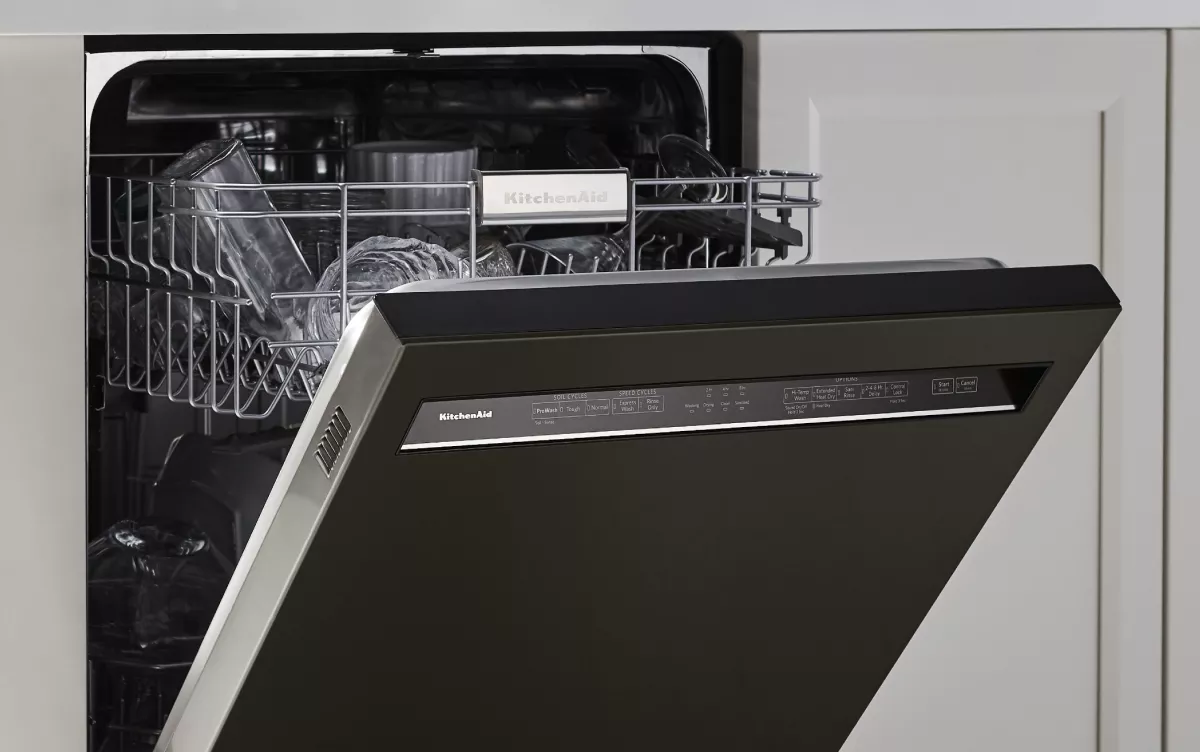
The control panel controls the dishwasher's start function. Faulty buttons or a locked panel can stop it from starting.
Try these checks:
- Make sure the control lock is off.
- Press each button to check if it responds.
- Reset the dishwasher by unplugging it for one minute.
- Look for any visible damage or moisture inside the panel.
Credit: www.kitchenaid.com
Resolving Water Drainage Problems
Water drainage problems are common in Kitchen Aid dishwashers. These issues can stop the dishwasher from cleaning properly.
Fixing drainage problems often involves checking a few key parts. Cleaning and inspecting these parts helps your dishwasher drain water well.
Cleaning The Drain Filter
The drain filter catches food and debris to stop clogs. Over time, it can get blocked and stop water from draining.
Remove the filter from the dishwasher bottom. Rinse it under running water to clean off trapped debris.
- Turn off the dishwasher and open the door.
- Remove the bottom rack to access the filter.
- Twist and lift the filter out carefully.
- Rinse the filter under warm water.
- Replace the filter securely in its place.
Checking The Drain Hose
The drain hose carries water from the dishwasher to the sink drain. If it bends or clogs, water cannot flow out.
Look for kinks or blockages in the hose. Clear any debris inside the hose to help water drain freely.
- Locate the drain hose behind the dishwasher.
- Inspect the hose for bends or sharp turns.
- Disconnect the hose carefully from the dishwasher.
- Use a long brush or water to clear any clogs.
- Reconnect the hose firmly to prevent leaks.
Examining The Drain Pump
The drain pump pushes water out through the drain hose. A broken pump stops drainage and causes water to stay inside.
Check the pump for damage or blockages. Remove any stuck debris and listen for strange noises when the pump runs.
- Unplug the dishwasher to avoid electric shock.
- Remove the bottom panel to access the drain pump.
- Look for debris or objects blocking the pump.
- Clean the pump area with a soft cloth.
- If the pump is damaged, contact a technician for replacement.
Improving Cleaning Performance
Your Kitchen Aid dishwasher cleans better with proper care. Small fixes can improve its cleaning power.
Check parts and settings often to keep dishes spotless after every wash.
Cleaning Spray Arms
Spray arms spread water inside the dishwasher. Dirt or debris can block their holes. This lowers cleaning quality.
- Remove the spray arms carefully.
- Use a toothpick to clear clogged holes.
- Rinse arms under running water.
- Check for cracks or damage.
- Reinstall the spray arms securely.
Using The Right Detergent
Detergent type affects cleaning results. Use detergent made for dishwashers only. Avoid too much detergent.
| Detergent Type | Best Use |
| Powder | Good for hard water |
| Gel | Works well for light stains |
| Pods/Tablets | Easy to use, balanced cleaning |
Checking Water Temperature
Water temperature must be hot enough to clean dishes. Ideal range is 120°F to 140°F (49°C to 60°C).
- Run hot water at the sink before starting dishwasher.
- Check your water heater setting.
- Use dishwasher’s sanitize cycle if available.
- Measure water temperature with a thermometer.
- Adjust settings if water is too cold.

Credit: www.youtube.com
Stopping Dishwasher Leaks
Dishwasher leaks cause damage and waste water. Fixing leaks saves money and keeps your kitchen clean.
Check common problem areas to stop leaks. Simple repairs often solve the issue quickly.
Inspecting Door Seals
Door seals stop water from escaping during a wash cycle. Dirt or damage can cause leaks.
- Open the dishwasher door and look for cracks or tears on the seal.
- Clean the seal with a damp cloth to remove food or debris.
- Press the seal gently to check if it fits tightly against the door frame.
- Replace the seal if it is worn out or broken.
Tightening Hose Connections
Loose or damaged hose connections can cause leaks under the dishwasher. Tighten and check hoses regularly.
| Hose Part | Check for | Action |
| Water Inlet Hose | Loose clamp, cracks | Tighten clamp, replace hose if cracked |
| Drain Hose | Leaks at connection, blockages | Secure hose, clear blockages |
| Spray Arm Hose | Leaks or cracks | Replace damaged hose |
Replacing Damaged Gaskets
Gaskets create a seal between parts inside the dishwasher. Old gaskets cause leaks during washing.
- Turn off power and water supply before replacing gaskets.
- Remove the old gasket carefully from the door or tub.
- Clean the area where the gasket sits to remove residue.
- Install the new gasket firmly and evenly along the groove.
- Test the dishwasher to ensure no leaks appear after replacement.
Reducing Unusual Dishwasher Noises
Strange noises from your Kitchen Aid dishwasher can be annoying. These sounds may mean some parts need cleaning or fixing.
Fixing these noises is often simple. You can check a few areas to reduce the sound and keep your dishwasher running well.
Cleaning The Filter And Pump
Dirt and food bits can block the filter and pump. This causes your dishwasher to make loud noises during use.
Remove the filter and pump parts carefully. Rinse them under running water to clear any debris or buildup.
- Turn off the dishwasher and unplug it first
- Locate the filter at the bottom of the tub
- Take out the filter and clean it with water
- Check the pump area for stuck debris
- Replace the filter and secure it properly
Checking For Loose Parts
Loose screws or parts inside the dishwasher cause rattling or banging sounds. Check all visible parts for tightness.
Use a screwdriver to tighten any loose screws. Also, check spray arms and racks for secure fitting.
- Open the dishwasher door and inspect racks
- Check spray arms for movement or damage
- Tighten screws on panels and covers
- Make sure the dishwasher is level on the floor
Lubricating Moving Components
Dry or worn parts can create grinding or squeaking noises. Lubricate moving parts to reduce friction and noise.
Use a small amount of food-safe lubricant on hinges, wheels, and spray arm bearings. Avoid over-lubricating.
- Unplug the dishwasher before working on it
- Apply lubricant to rack wheels and rails
- Lubricate door hinges and latch mechanisms
- Spin spray arms to check smooth movement
Credit: www.searspartsdirect.com
When To Call A Professional
Fixing a Kitchen Aid dishwasher can be simple or complex. Some problems need expert help. Knowing when to call a professional saves time and avoids damage.
This guide helps you spot issues that are too hard or risky to fix alone. Read on to learn more about complex electrical issues, major mechanical failures, and safety concerns.
Complex Electrical Issues
Electrical problems in your dishwasher can be dangerous. These include power failures, wiring issues, or control board faults. If you see sparks or smell burning, stop using the dishwasher immediately.
- Dishwasher does not turn on or off
- Frequent tripping of circuit breakers
- Visible damage to wiring or plugs
- Burning smell or smoke near the appliance
- Control panel buttons do not respond
Major Mechanical Failures
Some mechanical parts can break or wear out over time. Fixing these requires special tools and knowledge. Examples include broken pumps, motors, or door latches.
| Mechanical Issue | Signs | Why Call a Pro |
|---|---|---|
| Broken Pump | Water leaks, dishwasher won’t drain | Needs part replacement and testing |
| Motor Failure | Dishwasher makes loud noise or won’t start | Complex motor repair or swap |
| Faulty Door Latch | Dishwasher won’t start or stops mid-cycle | Requires proper alignment and parts |
Safety Considerations
Safety is the top priority when working with dishwashers. Certain problems need professional care to avoid injury or damage. Always unplug the appliance before inspecting.
Call a professional if you notice:
- Water leaking near electrical outlets
- Strong electrical shocks or tingling sensations
- Gas or chemical smells from the dishwasher
- Broken glass or sharp edges inside the machine
- If you feel unsure about any repair
Frequently Asked Questions
How Do I Reset My Kitchen Aid Dishwasher?
To reset, press the "Heated Dry" and "Normal" buttons simultaneously for 3 seconds. This clears errors and restarts the cycle.
Why Is My Kitchen Aid Dishwasher Not Draining?
Check and clean the drain filter and hose for clogs. A blocked drain often causes water to remain inside.
How Can I Fix A Leaking Kitchen Aid Dishwasher?
Inspect door seals and spray arms for damage. Replace faulty parts and ensure the dishwasher is level to stop leaks.
What Causes My Kitchen Aid Dishwasher To Not Start?
Ensure the door is fully closed and locked. Check power supply and reset the circuit breaker if needed.
Conclusion
Fixing your KitchenAid dishwasher is simpler than it seems. Follow these easy steps. First, check the power connection. Then, inspect for any blockages. Clean the filters regularly to maintain efficiency. Listen for unusual noises; they can signal issues. Ensure the spray arms move freely.
Always use the recommended detergent. Regular maintenance extends the dishwasher's life. Consult the manual for troubleshooting tips. When in doubt, seek professional help. These steps ensure your dishwasher runs smoothly. Keep it in top condition with these simple checks. Happy washing!