Are you tired of strange tastes or smells coming from your KitchenAid refrigerator water? You’re not alone.
Many homeowners overlook the importance of regularly changing their refrigerator water filter, which can lead to less than fresh water and ice. But don’t worry—changing your KitchenAid refrigerator water filter is easier than you might think. In this guide, we’ll walk you through the simple steps to ensure your water remains crisp and clean.
Keep reading, and you’ll soon have the confidence to handle this task like a pro, saving you time, money, and the hassle of unnecessary repairs. Your family deserves the best, and that starts with something as simple as a fresh water filter. Dive into the details, and discover just how easy it is to keep your water tasting great!
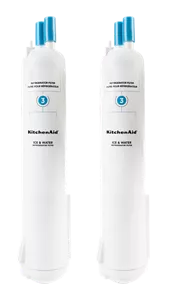
Credit: www.kitchenaid.com
Signs To Replace Filter
Your Kitchen Aid refrigerator water filter needs changing regularly. Using an old filter can affect water quality and appliance performance.
Watch for clear signs that show the filter is no longer working well. These signs help you know when to replace it.
Water Taste And Odor Changes
One of the first signs to replace the filter is a change in water taste or smell. The water may taste flat, stale, or have a bad odor.
This happens because the filter is no longer trapping impurities. Clean water should taste fresh and odor-free.
Filter Indicator Light
Most Kitchen Aid refrigerators have a filter indicator light. This light turns on to show the filter needs replacement.
Check your refrigerator manual to understand the light signals. Replace the filter as soon as the light alerts you.
Reduced Water Flow
If water flows slowly from the dispenser, your filter might be clogged. A dirty filter blocks water flow.
Replacing the filter usually fixes this problem and restores normal water flow.
Choosing The Right Filter
Changing your Kitchen Aid refrigerator water filter keeps your water clean and fresh. Picking the right filter is important for the best taste and safety.
This guide helps you find the correct filter for your Kitchen Aid fridge. It covers compatible models, filter types, and where to buy.
Compatible Models
Not all filters fit every Kitchen Aid refrigerator. Check your model number before buying a filter. Using the wrong filter may cause leaks or poor water quality.
Kitchen Aid uses different filters for various fridge lines. Most filters fit side-by-side and bottom freezer models.
- Kitchen Aid Side-by-Side Refrigerators
- Kitchen Aid Bottom Freezer Refrigerators
- Kitchen Aid French Door Refrigerators
- Kitchen Aid Built-In Refrigerators
Filter Types
Kitchen Aid water filters come in different types. Each type removes certain impurities from water. Choose a filter based on your water needs and fridge model.
- Carbon Filters: Remove chlorine and odors
- Activated Carbon Filters: Improve taste and smell
- Micron Filters: Block small particles and sediment
- Combination Filters: Use multiple methods for cleaner water
Check your refrigerator manual for recommended filter types. Using the right filter type ensures clean water and ice.
Where To Buy
You can buy Kitchen Aid water filters from several places. Choose trusted sellers to avoid fake or low-quality filters.
- Official Kitchen Aid website or authorized dealers
- Major appliance stores
- Online retailers with good reviews
- Local home improvement stores
Compare prices and check filter model numbers before buying. Always buy filters that meet Kitchen Aid standards.
Preparing For Replacement
Changing the water filter in your Kitchen Aid refrigerator keeps your water clean and fresh. Before you start, it is important to prepare properly.
Preparation makes the replacement easier and prevents damage to your fridge. Follow these simple steps to get ready.
Gathering Tools
Having the right tools ready will help you change the filter quickly. Most Kitchen Aid filters do not need many tools.
- A new Kitchen Aid water filter that fits your model
- A clean cloth to wipe any spills
- A small bucket or bowl to catch water drips
- Optional: gloves to keep your hands clean
Turning Off Water Supply
Turning off the water supply stops water flow during filter replacement. This prevents leaks and water damage.
Find the water valve usually located behind the refrigerator or under the sink. Turn it clockwise to close the water supply.
- Locate the water shut-off valve
- Turn the valve clockwise to stop water
- Check that water has stopped by running the water dispenser
Locating The Filter
The water filter location varies by Kitchen Aid refrigerator model. It is usually inside the fridge or at the base grille.
Look for a small, round or rectangular cover that holds the filter. Check your owner’s manual if you cannot find it.
- Open the refrigerator door
- Look in the upper right corner or inside the fresh food compartment
- Check the base grille near the floor
- Remove the cover to access the filter
Removing The Old Filter
Changing the water filter in your Kitchen Aid refrigerator is important for clean water. Removing the old filter is the first step. Follow simple instructions to do this safely.
This guide covers unlocking the filter and handling the old filter carefully. Take your time to avoid damage.
Unlocking The Filter
Find the filter inside the refrigerator. It is usually in the upper right corner or near the bottom grille. To unlock it, turn the filter counterclockwise. Turn it until it stops and feels loose. Pull the filter straight out gently.
Handling The Old Filter
After removing the filter, handle it with care. Some water may drip from it. Keep a towel nearby to catch any spills. Do not shake or drop the filter. Keep it upright until you dispose of it.
- Place the old filter in a plastic bag to avoid leaks.
- Check your refrigerator manual for disposal instructions.
- Wash your hands after handling the filter.
- Prepare the new filter before disposal of the old one.
Installing The New Filter
Changing your Kitchen Aid refrigerator water filter keeps your water clean. Installing the new filter is simple and quick.
Follow these steps to fit the new filter correctly. This will help your fridge work well and give you fresh water.
Aligning And Inserting
First, remove any protective covers from the new filter. Look for the arrows or marks on the filter and filter slot. These marks help you line up the filter correctly.
- Hold the filter with the arrows facing the slot.
- Push the filter gently into the slot.
- Turn the filter clockwise until it stops.
Securing The Filter
After inserting, secure the filter so it does not move. This keeps the water sealed and clean inside your fridge.
- Make sure you hear a click when turning the filter.
- Do not force the filter if it does not turn easily.
- If it feels loose, remove and try again.
Resetting The Indicator Light
The filter change light helps you know when to replace the filter. Reset it after installing the new filter to track usage correctly.
| Model | Reset Method |
| Kitchen Aid Side-by-Side | Press and hold the reset button for 3 seconds |
| Kitchen Aid French Door | Open the fridge door and press the light button 5 times |
| Kitchen Aid Top-Freezer | Hold the water filter reset button until the light turns off |
Flushing The New Filter
After installing a new Kitchen Aid refrigerator water filter, flushing is important. This process clears out any loose carbon particles and air in the filter.
Flushing helps improve water taste and protects your refrigerator’s water system.
Running Water Through Filter
Turn on the water dispenser and let water run through the new filter. Run at least three gallons of water to flush the system well.
Use a large container to catch the water. This keeps your floor dry and helps you measure the water amount.
- Turn on water dispenser continuously
- Collect water in a large container
- Run water for about 3 gallons
- Turn off dispenser after flushing
Checking For Leaks
Look under and around the filter for water leaks after flushing. Leaks may appear as drips or wet spots.
If you find leaks, turn off the water supply. Check if the filter is properly installed and tightened.
- Inspect filter area for wet spots
- Check filter alignment and fit
- Tighten filter by hand if needed
- Turn off water if leaks continue
Ensuring Proper Water Flow
After flushing and checking for leaks, test the water flow from the dispenser. Water should flow steady and strong.
If flow is weak or slow, try resetting the filter or checking for clogs in the line.
- Press water dispenser to test flow
- Water should flow steady and fast
- Reset filter if water flow is weak
- Check water line for blockages
Maintenance Tips
Keeping your Kitchen Aid refrigerator water filter in good shape is important. Regular care ensures clean water and longer filter life.
Follow simple steps to change and maintain the water filter. This helps avoid problems and keeps your water fresh.
Regular Replacement Schedule
Change the water filter every six months. This timing helps prevent clogging and bad taste.
If your water flow slows or water tastes strange, replace the filter sooner. Mark your calendar to remember replacement dates.
- Change filter every 6 months
- Replace earlier if water tastes odd
- Check filter status light if available
- Write replacement date on the filter
Cleaning The Filter Housing
Clean the filter housing when changing the filter. Dirt or mold can build up and affect water quality.
Use a soft cloth and warm water to wipe inside the housing. Avoid harsh chemicals that can damage parts.
- Remove old filter before cleaning
- Wipe housing with soft cloth and warm water
- Dry housing before installing new filter
- Do not use bleach or strong cleaners
Troubleshooting Common Issues
If water flow is slow, check if the filter is clogged or installed incorrectly. Reset the filter indicator if needed.
Leaks can happen if the filter is not tight or the housing is dirty. Make sure to push the filter in firmly and clean the area.
- Slow water: replace or reinsert filter
- Leaks: check filter seal and clean housing
- Bad taste: change filter immediately
- Reset indicator after filter change

Credit: www.youtube.com

Credit: www.searspartsdirect.com
Frequently Asked Questions
How Do I Change A Kitchenaid Refrigerator Water Filter?
To change the filter, locate it inside the fridge or grille. Turn off water supply, twist the old filter counterclockwise, remove it, insert the new filter, and twist clockwise until secure. Flush water for 3-5 minutes to clear air and impurities.
When Should I Replace My Kitchenaid Water Filter?
Replace the filter every 6 months or after filtering 200 gallons. If water flow decreases or tastes odd, change it sooner. Regular replacement ensures clean, fresh-tasting water and protects your refrigerator’s water system.
What Type Of Water Filter Fits Kitchenaid Refrigerators?
Use filters specifically designed for KitchenAid models. Most are certified by NSF/ANSI standards for safety and effectiveness. Check your fridge model number to select the correct filter for optimal performance and compatibility.
Can I Reset The Water Filter Indicator Light?
Yes, after changing the filter, press and hold the reset button on the control panel for 3 seconds. The light will turn off, indicating the filter status is reset and ready for use.
Conclusion
Changing your Kitchen Aid refrigerator water filter keeps water fresh and clean. It only takes a few simple steps to do it yourself. Regular changes help your fridge work better and taste better. Don’t wait until the water tastes odd or the filter light turns on.
Stay on schedule for the best results. Clean water means a healthier home. Now, you know how to change your filter easily. Simple, quick, and important.