
When you’re in the kitchen, precision and control are key, especially when using your trusty KitchenAid mixer. Have you ever found yourself wondering what exactly “low speed” means on your mixer?
Understanding the nuances of speed settings can transform your baking and cooking experience from good to extraordinary. Whether you’re whipping up a delicate meringue or kneading dough for your favorite bread, knowing which speed to use can make all the difference.
Stick around, because this article will demystify what is considered low speed on a KitchenAid mixer, ensuring you get the perfect results every time. Ready to elevate your culinary skills? Let’s dive in!
Kitchenaid Mixer Speed Settings
Kitchenaid mixers have multiple speed settings. Each speed is designed for specific mixing tasks.
Knowing what is low speed helps you use the mixer safely and effectively.
Speed Range Explained
Low speed on a Kitchenaid mixer generally means speeds 1 to 3. These speeds rotate the beaters slowly.
- Speed 1: Very slow stirring or combining ingredients gently.
- Speed 2: Slow mixing for thicker batters or dough.
- Speed 3: Slightly faster for blending and light mixing.
Purpose Of Each Speed
| Speed Setting | Purpose | Example Use |
| 1 (Stir) | Slowly combine ingredients without splashing | Mixing dry ingredients, adding flour |
| 2 (Slow Mix) | Mix thick batters gently | Bread dough, cookie dough |
| 3 (Mix) | Blend ingredients smoothly | Light cake batters, frostings |
| 4 and above (Medium to High) | Whip, beat, and aerate ingredients | Whipped cream, meringue, quick mixing |
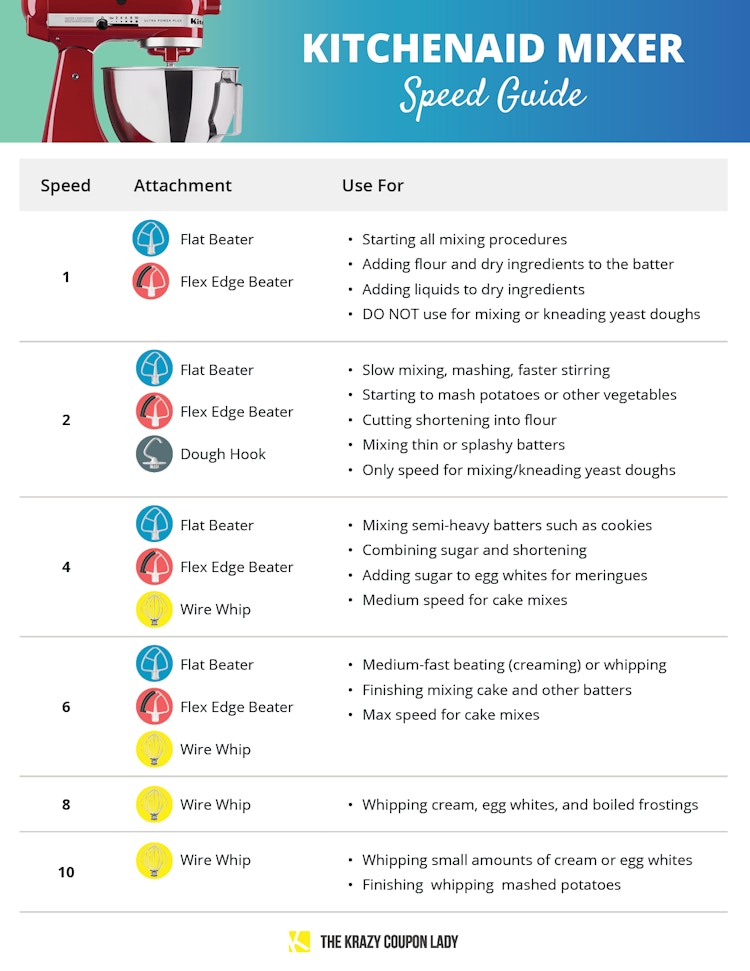
Credit: thekrazycouponlady.com
Identifying Low Speed On Kitchenaid
Low speed on a KitchenAid mixer means the mixer runs slowly to mix ingredients gently. It helps control the mixing process without splashing or overworking the batter.
Understanding which speed is low speed helps you use the mixer properly. It protects your ingredients and improves your recipes.
Speed Numbers And Their Functions
KitchenAid mixers have speed settings usually numbered from 1 to 10. Low speeds are the lower numbers on the dial.
Speeds 1 and 2 are considered low speeds. They turn the mixer slowly and mix ingredients gently.
- Speed 1: Very slow mixing, used for starting the mixer and adding dry ingredients.
- Speed 2: Slow mixing for combining ingredients without splashing.
Typical Uses For Low Speed
Low speeds on KitchenAid mixers are good for tasks that need care. They help mix without making a mess.
Using low speed is best for gentle mixing and careful folding of ingredients.
- Mixing dry ingredients into wet ones slowly
- Starting the mixer to avoid flour splashing out
- Gently folding in delicate ingredients like whipped cream
- Mixing dough or batter without overworking it
Low Speed Benefits
Low speed on a KitchenAid mixer means the mixer runs slowly. It helps mix ingredients gently and carefully.
Using low speed is good for many recipes. It helps keep the ingredients from making a mess.
Preventing Ingredient Splash
Low speed stops ingredients from splashing out of the bowl. It keeps your kitchen clean and saves food.
When you start mixing, low speed blends gently. It mixes dry and wet ingredients without spilling.
- Reduces mess around the mixer
- Prevents waste of ingredients
- Makes cleanup easier and faster
Better Control And Mixing
Low speed gives you better control over mixing. You can watch how ingredients combine slowly.
This speed is good for gentle mixing. It stops over-mixing and keeps the texture right.
- Prevents overworking dough or batter
- Helps mix delicate ingredients carefully
- Allows gradual ingredient blending
When To Use Low Speed
Low speed on a KitchenAid mixer means the slowest mixing setting. It is gentle and helps avoid overworking ingredients.
Use low speed to mix ingredients carefully. It helps blend without splashing or making a mess.
Mixing Dry Ingredients
Use low speed to mix flour, baking powder, and spices. It spreads them evenly without dust flying.
This speed stops dry ingredients from scattering outside the bowl. It keeps your kitchen clean.
Incorporating Wet Ingredients
Low speed helps add wet ingredients to dry ones gently. It avoids splashing and uneven mixing.
It also helps mix eggs or oils slowly, so the batter stays smooth and thick.
Kneading Dough
Low speed is best for kneading dough. It lets the dough form without tearing or heating up.
Mixing slowly helps gluten develop well. This makes the dough stretchy and ready to rise.
Common Mistakes With Speed Settings
Using the right speed on your KitchenAid mixer is important for good results. Many people make mistakes with speed settings.
These errors can affect how your ingredients mix and change the texture of your food.
Using Too High Speed
One common mistake is using too high speed for mixing. High speed can cause ingredients to splash out of the bowl.
It can also make the mixer work too hard and overheat. Some ingredients need gentle mixing at low speed.
- Flour dusts out when mixed too fast
- Delicate ingredients may break down
- Overmixing can change texture
Not Adjusting Speed Properly
Another mistake is not changing the speed as needed. Different recipes and stages need different speeds.
Starting at low speed then increasing helps combine ingredients well and avoids messes.
- Start slow to avoid splashes
- Increase speed for whipping or beating
- Slow speed for folding or mixing dough

Credit: www.cakesandmore.in
Tips For Optimal Mixing
Using the right speed on your KitchenAid mixer can improve your mixing results. Low speed settings help control the process and avoid splashing.
Understanding how to start slow and increase speed, plus choosing the correct attachment, makes mixing easier and better.
Starting Slow And Increasing Speed
Begin mixing at a low speed to combine ingredients without making a mess. Slowly increase speed as the mixture thickens or becomes more uniform.
- Start at speed 1 or 2 for gentle mixing.
- Watch the mixture to avoid splattering.
- Increase speed gradually up to speed 4 or 6 if needed.
- Use higher speeds only when the ingredients are well combined.
Choosing The Right Attachment
Different attachments work best for different tasks. Using the right one helps you mix efficiently and get the best results.
| Attachment | Best For | Recommended Speed |
| Flat Beater | Mixing batters and doughs | Low to Medium (2-6) |
| Wire Whip | Whipping cream and egg whites | Medium to High (4-10) |
| Dough Hook | Kneading bread dough | Low (2-4) |
Credit: www.consumerreports.org
Frequently Asked Questions
What Speed Is Low On A Kitchenaid Mixer?
Low speed on a KitchenAid mixer typically ranges from 1 to 4. It is ideal for stirring and slow mixing tasks. This speed prevents ingredients from splattering and ensures gentle blending without overworking the mixture.
Why Use Low Speed On Kitchenaid Mixers?
Low speed helps combine delicate ingredients without damaging texture. It is perfect for stirring batters, folding in ingredients, and mixing dry components gently. Using low speed preserves the quality of mixtures and avoids overmixing or splashing.
How Does Low Speed Affect Dough Mixing?
Low speed allows gradual hydration of flour and ingredients. It prevents overheating the dough and developing too much gluten early. This speed ensures a smooth, even dough texture, ideal for yeast breads and pastries requiring gentle kneading.
Can Low Speed Prevent Splattering In Mixers?
Yes, low speed minimizes splattering by mixing ingredients slowly. It controls the motion inside the bowl, reducing mess and waste. Using low speed is especially useful for liquid or powder ingredients to keep the kitchen clean.
Conclusion
Low speed on a KitchenAid mixer means the slowest setting for mixing. It helps gently combine ingredients without splashing. Use low speed for delicate tasks like folding or slow stirring. This setting protects your ingredients and keeps everything neat. Knowing this speed saves time and improves your cooking results.
Always start slow to avoid messes. The low speed setting is simple but very useful in many recipes. Keep this tip in mind for better mixing every time.